
Download TOPVSBEST – Free AI Image Creator, Online AI Art Generator
Overview: Why TOPVSBEST Stands Out in the AI Image Landscape
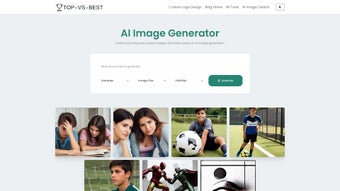
TOPVSBEST, also marketed under the name Imgurai, is a browser‑based AI image generator that lets anyone—from seasoned designers to casual hobbyists—produce high‑quality, original visuals in a matter of seconds. Powered by the latest diffusion models, the engine interprets plain‑language prompts and translates them into vivid PNG files without requiring any local GPU horsepower or costly software licenses. The platform’s user interface follows a minimalist philosophy: a single prompt field, a resolution selector (256×256 or 512×512), a privacy toggle, and a “Generate” button.
After a brief processing interval, a preview thumbnail appears, and users can download the final image with one click. Because the service runs entirely in the cloud, there is nothing to install, no updates to manage, and the experience is identical across Windows, macOS, Linux, Android, and iOS devices. This universal accessibility makes TOPVSBEST especially appealing for marketers needing rapid social‑media graphics, educators illustrating concepts, freelancers delivering client mockups, and even developers who want to integrate AI‑generated art into their applications via the optional REST API.
The free tier supplies generous daily limits, while paid plans unlock higher resolutions, priority rendering queues, and commercial‑use licensing. In essence, TOPVSBEST merges cutting‑edge AI technology with the ease of a web app, delivering a secure, cost‑effective, and reliable solution for all image‑creation requirements.
Key Features & Capabilities of TOPVSBEST
- AI‑Driven Generation: Utilises state‑of‑the‑art diffusion models to produce one‑of‑a‑kind visuals from text prompts.
- Multiple Resolutions: Choose between 256×256 for quick thumbnails or 512×512 for higher‑detail assets.
- Public vs. Private Mode: Keep creations private for exclusive use or share publicly to contribute to the community gallery.
- Instant Preview & Download: View a live preview and download the final PNG with a single click.
- Cross‑Platform Compatibility: Runs in any modern browser, making it usable on Windows, macOS, Linux, Android, and iOS.
- Free Tier with Generous Limits: Generate up to 20 images per day without paying, perfect for occasional creators.
- Premium Upgrade Options: Access 1024×1024 resolution, faster rendering queues, and commercial‑use licensing.
- Secure Data Handling: All uploads are encrypted, and private images are stored only for the duration of the session.
- Extensive Prompt Library: Built‑in suggestions help newcomers craft effective prompts quickly.
- Community Gallery: Browse public creations for inspiration and see how the AI interprets similar concepts.
Beyond the checklist above, TOPVSBEST’s development team continuously refines the underlying model to improve realism, colour accuracy, and stylistic diversity. Recent updates have introduced support for batch generation, allowing users to queue multiple prompts in a single session—a feature that is particularly valuable for agencies producing large volumes of visual content. The platform also offers custom style presets, enabling creators to maintain brand consistency across dozens of images without manually tweaking each prompt.
For educators, the built‑in prompt library doubles as a teaching aid, demonstrating how nuanced language influences AI output. Meanwhile, business users benefit from the ability to generate on‑demand, royalty‑free illustrations for presentations, marketing collateral, or product mock‑ups, dramatically cutting down on outsourcing costs. Overall, the breadth of features strikes a harmonious balance between raw power and user‑friendly simplicity, positioning TOPVSBEST as a versatile addition to any digital workflow.
Getting Started: Installation, Setup, and Daily Use
Because TOPVSBEST is a pure web application, there is no traditional installation process. To begin, open your preferred browser (Chrome, Firefox, Edge, Safari, or any Chromium‑based mobile browser) and navigate to https://topvsbest.ai. The homepage greets you with a clean prompt box, resolution selector, and privacy toggle. Follow these steps for a smooth experience:
- Create an Account (Optional): While you can generate images anonymously, signing up with an email or social login grants you access to your personal history, higher daily limits, and the ability to save favorite prompts.
- Enter Your Prompt: Describe the image you want in plain language. For example, “a sunrise over a misty mountain range in pastel colors.” The AI understands context, style cues, and even specific objects.
- Select Resolution: Choose 256×256 for quick drafts or 512×512 for detailed social‑media graphics. Premium users may opt for 1024×1024 for print‑ready files.
- Set Visibility: Toggle “Public” if you wish to contribute to the community gallery; otherwise, keep it “Private” for exclusive use.
- Generate & Review: Click the “Generate” button. Within a few seconds, a preview appears. If the result isn’t perfect, you can refine the prompt or click “Regenerate” for a new variation.
- Download Your Image: Once satisfied, hit the “Download PNG” link. The file saves directly to your device’s default download folder.
Power users can take advantage of URL‑based prompts, embedding query parameters such as ?prompt=cat+in+space&size=512 to trigger generation from automation platforms like Zapier or custom scripts. This makes TOPVSBEST a valuable component in batch‑content pipelines, where hundreds of images can be produced with minimal manual effort. The cloud‑native architecture ensures that all updates, security patches, and model improvements are applied automatically—there’s no need to download patches or restart software. Should any issues arise, the “Help” menu provides a searchable knowledge base, live chat with support agents, and a community forum where users share tips and troubleshoot common problems. By keeping the onboarding flow straightforward and offering extensive resources, TOPVSBEST guarantees that even first‑time visitors can generate professional‑grade visuals in under five minutes.
Pros, Cons, Frequently Asked Questions, and Final Verdict
Pros
- Completely free tier with generous daily limits.
- No installation required; works on any device with a modern browser.
- High‑quality 512×512 PNG output suitable for social media and web use.
- Secure handling of private images and encrypted data transmission.
- Rapid updates and responsive support community.
- Batch generation and API access for paid users.
- Extensive prompt library reduces learning curve.
- Community gallery offers inspiration and showcases AI capabilities.
Cons
- Maximum resolution limited to 512×512 on the free plan.
- Heavy reliance on internet connectivity; offline use not possible.
- Public gallery may expose creative ideas if privacy is not set correctly.
- Premium pricing may be a barrier for small freelancers needing higher resolutions.
- Advanced features such as API access are restricted to paid tiers.
Frequently Asked Questions
Is TOPVSBEST really free?
Yes, the core service is free and allows up to 20 image generations per day. Premium plans are optional for higher resolution and faster processing.
Can I use the generated images for commercial purposes?
Commercial use is permitted for images created under a paid subscription. Free‑tier images are for personal or non‑commercial projects only.
What browsers are supported?
Any modern browser that supports WebGL and HTTPS, including Chrome, Firefox, Edge, Safari, and mobile equivalents.
How does TOPVSBEST ensure my private images stay private?
Private images are stored only for the active session and are never indexed in the public gallery. All data transfers are encrypted via TLS.
Is there an API for developers?
TOPVSBEST offers a RESTful API for paid accounts, enabling automated image generation and integration with third‑party workflows.
Conclusion & Call to Action
In the crowded arena of AI art generators, TOPVSBEST distinguishes itself through a blend of accessibility, security, and quality. Its web‑only delivery eliminates hardware barriers, while the free tier provides enough juice for everyday creators to experiment without financial commitment. Although the resolution ceiling may push power users toward the premium plan, the value delivered at no cost is substantial enough to warrant recommendation for marketers, small businesses, educators, and hobbyists alike. If you’re looking for a hassle‑free way to generate bespoke visuals for social media, blog posts, or internal presentations, TOPVSBEST is ready to serve—just open a browser, type a prompt, and watch the magic happen. Download TOPVSBEST now and start creating stunning AI‑powered images instantly!



.png)



